Powershell Obfuscation
Intro
Due to its deep roots on Windows systems and access to .NET libraries, Powershell is a powerful tool for administrators and attackers alike. It offers a wide range of possibilities to write regular and malicious script code and obfuscate it to the point of unreadability and undetectability by antiviruses. Moreover the code can be executed directly in memory, so that no files and further traces are left on the drive.
The use of Powershell allows an attacker initial access to the victim’s system – for example through phishing attachments – as well as to move laterally on the victim’s network and inject further malicious code.
It is not surprising that this tool stands at the top of the attacker’s tool list, be it through self-written and obfuscated code or through frameworks such as Empire and PowerSploit.
In this article, I will show many of the attacker’s methods to obfuscate and hide malicious Powershell code and how to detect and analyze it. The obfuscation techniques shown do not have to stand alone but can also be used in combination.
Powershell
Powershell offers a variety of ways to obfuscate script code. In the following, the language-specific features of Powershell that are suitable for script obfuscation are described.
Function Overwriting
Powershell offers built-in functions (Cmdlets) that can be overridden in the profiles. This way malicious code can be added to a regular Cmdlet, which is executed in the background when the Cmdlet is called.
In the following example, the build-in function Get-ChildItem is extended through the profile.
function Get-ChildItem {
    Microsoft.PowerShell.Management\Get-ChildItem
    # malicious code...
    Write-Output "[+] Malicious code executed!"
}

# PS> Get-ChildItem
#
# Directory: C:\Users\Victim\Desktop\Files
#
# Mode LastWriteTime Length Name
# ---- ------------- ------ ----
# -a---- 01.05.2023 13:05 0 file1
# -a---- 01.05.2023 13:05 0 file2
# -a---- 01.05.2023 13:05 0 file3
#
# [+] Malicious code executed!
Aliases
Powershell allows a large number of alternative notations and abbreviations for built-in functions, which can be viewed using the Get-Alias command. Parameters can also be abbreviated as desired, as long as there are no ambiguities (e.g. ExecutionPolicy to ep or exe). All of the commands listed below result in identical output.
Write-Output "Malicious code executed!"
write "Malicious code executed!"
echo "Malicious code executed!"

# PS> Malicious code executed!
Calloperators, Wildcards
With the call operators (& or .) a function can be called. In combination with the Get-Command function (abbr. gcm), which enables the command search with the wildcard character *, a command call can be shortened and thus obfuscated.
&(gcm *te-Ou*) "Malicious code executed!"

# PS> Malicious code executed!
Case, Escape-, Whitespacecharacters
There is no distinction between upper and lower case. Spaces are ignored regardless of their length, allowing malicious code to be hidden at the end of a regular command. The backtick ` is used as an escape character. Unless this is used before a predefined character such as `n for a new line or `t for a tab, it is also ignored.
&("`wR"+ "It`e" + "-o"+"ut`Put") "`Ma`licious` code e`xecuted`!"

# PS> Malicious code executed!
.NET-Functions
Through .NET access, .NET functions can also be used instead of native Powershell functions.
[System.Console]::WriteLine("Malicious code executed!")

# PS> Malicious code executed!
Specialcharacters
Another obfuscation option is to assign special character variables ${} to integers, which can be incremented through the increment operator ++ and casted to suitable characters. The special variable assignment using ${} allows the use of special characters (including spaces) as variable identifiers. The cast operator and required Cmdlets – such as iex – can be assembled using the subexpression operator $(), method resolutions and array index operators.
The following special character command was obfuscated with Invoke-Obfuscation by Daniel Bohannon.
${~%=}=+$();${~^}=${~%=};${=[}=++${~%=};${+-}=++${~%=};${=-^}=++${~%=};${*]}=++${~%=};${~``}=++${~%=};${)^}=++${~%=};${)}=++${~%=};${$^}=++${~%=};${.]}=++${~%=};${``}="["+"$(@{})"[${)}]+"$(@{})"["${=[}${.]}"]+"$(@{})"["${+-}${~^}"]+"$?"[${=[}]+"]";${~%=}="".("$(@{})"["${=[}${*]}"]+"$(@{})"["${=[}${)^}"]+"$(@{})"[${~^}]+"$(@{})"[${*]}]+"$?"[${=[}]+"$(@{})"[${=-^}]);${~%=}="$(@{})"["${=[}"+"${*]}"]+"$(@{})"[${*]}]+"${~%=}"["${+-}"+"${)}"];.${~%=}("${``}${$^}${)}+${``}${=[}${=[}${*]}+${``}${=[}${~^}${~``}+${``}${=[}${=[}${)^}+${``}${=[}${~^}${=[}+${``}${*]}${~``}+${``}${)}${.]}+${``}${=[}${=[}${)}+${``}${=[}${=[}${)^}+${``}${=[}${=[}${+-}+${``}${=[}${=[}${)}+${``}${=[}${=[}${)^}+${``}${=-^}${+-}+${``}${=-^}${.]}+${``}${)}${)}+${``}${.]}${)}+${``}${=[}${~^}${$^}+${``}${=[}${~^}${~``}+${``}${.]}${.]}+${``}${=[}${~^}${~``}+${``}${=[}${=[}${=[}+${``}${=[}${=[}${)}+${``}${=[}${=[}${~``}+${``}${=-^}${+-}+${``}${.]}${.]}+${``}${=[}${=[}${=[}+${``}${=[}${~^}${~^}+${``}${=[}${~^}${=[}+${``}${=-^}${+-}+${``}${=[}${~^}${=[}+${``}${=[}${+-}${~^}+${``}${=[}${~^}${=[}+${``}${.]}${.]}+${``}${=[}${=[}${)}+${``}${=[}${=[}${)^}+${``}${=[}${~^}${=[}+${``}${=[}${~^}${~^}+${``}${=-^}${=-^}+${``}${=-^}${.]}|${~%=}")

# PS> Malicious code executed!
The Powershell code after resolving the special characters:
[CHar]87+[CHar]114+[CHar]105+[CHar]116+[CHar]101+[CHar]45+[CHar]79+[CHar]117+[CHar]116+[CHar]112+[CHar]117+[CHar]116+[CHar]32+[CHar]39+[CHar]77+[CHar]97+[CHar]108+[CHar]105+[CHar]99+[CHar]105+[CHar]111+[CHar]117+[CHar]115+[CHar]32+[CHar]99+[CHar]111+[CHar]100+[CHar]101+[CHar]32+[CHar]101+[CHar]120+[CHar]101+[CHar]99+[CHar]117+[CHar]116+[CHar]101+[CHar]100+[CHar]33+[CHar]39|iex

# PS> Malicious code executed!
The final code after resolving the byte characters:
Write-Output 'Malicious code executed!' | iex

# PS> Malicious code executed!
Strings
In the following, common string obfuscation techniques are shown, which can be used with any programming language in this or similar form.
Chaining
Characters can be concatenated using -split, -join, or the + sign.
Write-Output ("Malicious" + " " + "code" + " " + "executed!")
Write-Output ("MaliciousXXXcodeXXXexecuted!" -split "XXX" -join " ")

# PS> Malicious code executed!
Replacing
Character strings can be replaced using the -replace option.
Write-Output ("MaliciousXXXcodeXXXexecuted!" -replace("XXX"," "))

# PS> Malicious code executed!
Formatoperator
The format operator -f can be used to rearrange strings based on numerical order.
Write-Output ("{1} {0} {2}" -f "code", "Malicious", "executed!")

# PS> Malicious code executed!
Reversing
Strings can be reversed via array slicing.
Write-Output (-join "!detucexe edoc suoicilaM"[24 .. 0])

# PS> Malicious code executed!
Encoding
Obfuscation can also be achieved using common encoding methods.
Base64
The code to be executed can be Base64 encoded. The command encoded in this way can be started via Powershell with the -EncodedCommand option.
[Convert]::ToBase64String([Text.Encoding]::Unicode.GetBytes("Write-Output 'Malicious code executed!'")) | Write-Host

# PS> VwByAGkAdABlAC0ATwB1AHQAcAB1AHQAIAAnAE0AYQBsAGkAYwBpAG8AdQBzACAAYwBvAGQAZQAgAGUAeABlAGMAdQB0AGUAZAAhACcA

powershell -EncodedCommand "VwByAGkAdABlAC0ATwB1AHQAcAB1AHQAIAAnAE0AYQBsAGkAYwBpAG8AdQBzACAAYwBvAGQAZQAgAGUAeABlAGMAdQB0AGUAZAAhACcA"

# PS> Malicious code executed!
ASCII
ASCII-encoded commands can be executed after a byte conversion, for example via Invoke-Expression.
[Text.Encoding]::ASCII.GetBytes("Write-Output 'Malicious code executed!'") | Out-String | ForEach-Object {$_.Replace("`n",",").TrimEnd(",")}

# PS> 87,114,105,116,101,45,79,117,116,112,117,116,32,39,77,97,108,105,99,105,111,117,115,32,99,111,100,101,32,101,120,101,99,117,116,101,100,33,39

Invoke-Expression( -join [char[]](87,114,105,116,101,45,79,117,116,112,117,116,32,39,77,97,108,105,99,105,111,117,115,32,99,111,100,101,32,101,120,101,99,117,116,101,100,33,39))

# PS> Malicious code executed!
Hex
The use of hex encoding is possible in a similar way.
[Text.Encoding]::UTF8.GetBytes("Write-Output 'Malicious code executed!'") | ForEach-Object {"'" + $_.ToString("X2") + "'"} | Out-String | ForEach-Object {$_.Replace("`n",",").TrimEnd(",")}

# PS> '57','72','69','74','65','2D','4F','75','74','70','75','74','20','27','4D','61','6C','69','63','69','6F','75','73','20','63','6F','64','65','20','65','78','65','63','75','74','65','64','21','27'

Invoke-Expression( -join ('57','72','69','74','65','2D','4F','75','74','70','75','74','20','27','4D','61','6C','69','63','69','6F','75','73','20','63','6F','64','65','20','65','78','65','63','75','74','65','64','21','27' | ForEach-Object { ([Convert]::ToInt16($_.ToString(),16) -as [char]) }))

# PS> Malicious code executed!
Octal
The same is true for octal encoding.
[Text.Encoding]::UTF8.GetBytes("Write-Output 'Malicious code executed!'") | ForEach-Object { [Convert]::ToString($_, 8) } | Out-String | ForEach-Object {$_.Replace("`n",",").TrimEnd(",")}

# PS> 127,162,151,164,145,55,117,165,164,160,165,164,40,47,115,141,154,151,143,151,157,165,163,40,143,157,144,145,40,145,170,145,143,165,164,145,144,41,47

Invoke-Expression( -join (127,162,151,164,145,55,117,165,164,160,165,164,40,47,115,141,154,151,143,151,157,165,163,40,143,157,144,145,40,145,170,145,143,165,164,145,144,41,47 | ForEach-Object { ([Convert]::ToInt16($_.ToString(),8) -as [char]) }))

# PS> Malicious code executed!
Binary
And the same applies to binary encoding.
[Text.Encoding]::UTF8.GetBytes("Write-Output 'Malicious code executed!'") | ForEach-Object { [Convert]::ToString($_, 2) } | Out-String | ForEach-Object {$_.Replace("`n",",").TrimEnd(",")}

# PS> 1010111,1110010,1101001,1110100,1100101,101101,1001111,1110101,1110100,1110000,1110101,1110100,100000,100111,1001101,1100001,1101100,1101001,1100011,1101001,1101111,1110101,1110011,100000,1100011,1101111,1100100,1100101,100000,1100101,1111000,1100101,1100011,1110101,1110100,1100101,1100100,100001,100111

Invoke-Expression( -join (1010111,1110010,1101001,1110100,1100101,101101,1001111,1110101,1110100,1110000,1110101,1110100,100000,100111,1001101,1100001,1101100,1101001,1100011,1101001,1101111,1110101,1110011,100000,1100011,1101111,1100100,1100101,100000,1100101,1111000,1100101,1100011,1110101,1110100,1100101,1100100,100001,100111 | ForEach-Object { ([Convert]::ToInt16($_.ToString(),2) -as [char]) }))

# PS> Malicious code executed!
Encryption
XOR and SecureString encryption are shown below. Because of the .NET interface, all other .NET encryption algorithms can also be used with Powershell.
XOR
A command can be obfuscated using XOR and converted back again. The following example performs an XOR operation on each byte of the instruction with the value 0x42. The bytes can be converted back with the same value and by casting to ASCII.
[Text.Encoding]::UTF8.GetBytes("Write-Output 'Malicious code executed!'") | ForEach-Object { $_ -bxor 0x42 } | Out-String | ForEach-Object {$_.Replace("`n",",").TrimEnd(",")}

# PS> 21,48,43,54,39,111,13,55,54,50,55,54,98,101,15,35,46,43,33,43,45,55,49,98,33,45,38,39,98,39,58,39,33,55,54,39,38,99,101

Invoke-Expression (-join (21,48,43,54,39,111,13,55,54,50,55,54,98,101,15,35,46,43,33,43,45,55,49,98,33,45,38,39,98,39,58,39,33,55,54,39,38,99,101 | ForEach-Object { [char]($_ -bxor 0x42) }))

# PS> Malicious code executed!
SecureString (AES)
A command can be encrypted with AES by using the SecureString function.
# 16, 24 or 32 byte key size
$key = ([Text.Encoding]::Default.GetBytes("MySecretPassword"))

"Write-Output 'Malicious code executed!'" | ConvertTo-SecureString -AsPlainText -Force | ConvertFrom-SecureString -Key $key

# PS> 01000000d08c9ddf0115d1118c7a00c04fc297eb01000000178e91759fcacf468c330156d58c66bc000000000200000000001066000000010000200000003a3a0b242a307a48d03f6e105db3e209fa3b58021775721753365e5e72bc4f56000000000e8000000002000020000000cf4f9098c27d1aeeb7ba3ecd88252461b812830d3ea934b54e135c270c174a0e500000009e08b1ff1bc319d94ff2611253ecefdc46bb64e5a8a55ed2457cfc516ff6512cdebf9466e52452e4495e1582e2c048097fe6e317ad00692147dd03c8d6db7995028a534a807f22b44d720ebc80d9788a40000000c026f435426f31cdca4c087487fd32ea9ab53498ad8de3bfd2a73b27a59deb46f41c6670f3641a20323573e29ed04d0cc60d07ca3efcec0c6069bcda3d30edbb

Invoke-Expression( ([Runtime.InteropServices.Marshal]::PtrToStringAuto([Runtime.InteropServices.Marshal]::SecureStringToBSTR( ("01000000d08c9ddf0115d1118c7a00c04fc297eb01000000178e91759fcacf468c330156d58c66bc000000000200000000001066000000010000200000003a3a0b242a307a48d03f6e105db3e209fa3b58021775721753365e5e72bc4f56000000000e8000000002000020000000cf4f9098c27d1aeeb7ba3ecd88252461b812830d3ea934b54e135c270c174a0e500000009e08b1ff1bc319d94ff2611253ecefdc46bb64e5a8a55ed2457cfc516ff6512cdebf9466e52452e4495e1582e2c048097fe6e317ad00692147dd03c8d6db7995028a534a807f22b44d720ebc80d9788a40000000c026f435426f31cdca4c087487fd32ea9ab53498ad8de3bfd2a73b27a59deb46f41c6670f3641a20323573e29ed04d0cc60d07ca3efcec0c6069bcda3d30edbb" | ConvertTo-SecureString -Key $key)))))

# PS> Malicious code executed!
Compression
In Powershell RAW- and GZip compression are mainly used.
RAW
The command can be compressed and encoded as Base64. It can be decoded and decompressed in reverse order.
$memory_stream = New-Object IO.MemoryStream
$compressor = New-Object IO.Compression.DeflateStream($memory_stream, [IO.Compression.CompressionMode]::Compress)

$stream_writer = New-Object IO.StreamWriter($compressor)
$stream_writer.Write("Write-Output 'Malicious code executed!'")
$stream_writer.Close()

[System.Convert]::ToBase64String($memory_stream.ToArray())

# PS> Cy/KLEnV9S8tKSgtUVD3TczJTM7MLy1WSM5PSVVIrUhNLi1JTVFUBwA=

Invoke-Expression(New-Object IO.StreamReader((New-Object IO.Compression.DeflateStream([IO.MemoryStream][Convert]::FromBase64String("Cy/KLEnV9S8tKSgtUVD3TczJTM7MLy1WSM5PSVVIrUhNLi1JTVFUBwA="),[IO.Compression.CompressionMode]::Decompress)),[Text.Encoding]::ASCII)).ReadToEnd()

# PS> Malicious code executed!
GZip
The compression is done in the same way as RAW, except that the GZipStream function is used.
$memory_stream = New-Object IO.MemoryStream
$compressor = New-Object IO.Compression.GZipStream($memory_stream, [IO.Compression.CompressionMode]::Compress)

$stream_writer = New-Object IO.StreamWriter($compressor)
$stream_writer.Write("Write-Output 'Malicious code executed!'")
$stream_writer.Close()

[System.Convert]::ToBase64String($memory_stream.ToArray())

# PS> H4sIAAAAAAAEAAsvyixJ1fUvLSkoLVFQ903MyUzOzC8tVkjOT0lVSK1ITS4tSU1RVAcAcDv1sCcAAAA=

Invoke-Expression(New-Object IO.StreamReader((New-Object IO.Compression.GZipStream([IO.MemoryStream][Convert]::FromBase64String("H4sIAAAAAAAEAAsvyixJ1fUvLSkoLVFQ903MyUzOzC8tVkjOT0lVSK1ITS4tSU1RVAcAcDv1sCcAAAA="),[IO.Compression.CompressionMode]::Decompress)),[Text.Encoding]::ASCII)).ReadToEnd()

# PS> Malicious code executed!
Persistence
Powershell code can be hidden at the operating system level so that no malicious script files need to be placed on the victim’s system. This way, persistence can be achieved on the system, or anti-virus protection can be bypassed.
The following shows ways in which Powershell code can be applied to the system and executed without dropping files.
Profile
As described in Function Overwriting, the native Powershell functions can be overwritten system- and user-wide using Powershell profiles. This way, malicious code can be executed automatically as soon as Powershell is started. An automated start of Powershell in the background can be forced via the Task Scheduler or WMI, for example.
The following code is saved in the user profile file, which is always executed automatically when Powershell is started.
# Microsoft.PowerShell_profile.ps1
Write-Output "Malicious code automatically executed from: $($PSCommandPath)"

# PS> Malicious code automatically executed from: C:\Users\Victim\Documents\WindowsPowerShell\Microsoft.PowerShell_profile.ps1
Task Scheduler
Powershell code can be persisted and executed from the Task Scheduler. In the following example, a Powershell window with the output listed below is displayed every minute.
$action = New-ScheduledTaskAction -Execute "powershell.exe" -Argument "-ep bypass -NoExit -c Write-Output 'Malicious code executed every minute!'"

$trigger = New-ScheduledTaskTrigger -Once -At (Get-Date) -RepetitionInterval (New-TimeSpan -Minutes 1)

$principal = New-ScheduledTaskPrincipal -UserId $env:username -LogonType Interactive

Register-ScheduledTask -TaskName "MALICIOUS" -Action $action -Trigger $trigger -Principal $principal

# PS> Malicious code executed every minute!
Registry
Powershell code can also be stored in the Registry. Here, the command is first Base64-encoded and stored in a newly created registry key XXX. The value can then be read with Powershell.
$reg_val = [Convert]::ToBase64String([Text.Encoding]::Unicode.GetBytes("Write-Output 'Malicious code executed!'"))

New-Item "HKCU:\SOFTWARE" -Name "Malsoft"
New-ItemProperty "HKCU:\SOFTWARE\Malsoft" -Name "XXX" -Value $reg_val

powershell -EncodedCommand (Get-ItemProperty "HKCU:\SOFTWARE\Malsoft" -Name "XXX").XXX

# PS> Malicious code executed!
Environmentvariable
The environment variables also offer the possibility to save Powershell code.
In the following example, the environment variable XXX is created, where a Base64-encoded Powershell command is stored. The command can then be invoked using the environment variable value.
$env_var = [Convert]::ToBase64String([Text.Encoding]::Unicode.GetBytes("Write-Output 'Malicious code executed!'"))

[Environment]::SetEnvironmentVariable("XXX", $env_var, [EnvironmentVariableTarget]::User)

powershell -EncodedCommand ([Environment]::GetEnvironmentVariable("XXX"))

# PS> Malicious code executed!
Environment variables can also be used in this way to create a Cmdlet or a command from individual characters.
In the following, the abbreviation for the Invoke-Expression Cmdlet iex is created from the 4th, 26th, and 25th characters (counted from 0) of the ComSpec environment variable.
$env:ComSpec
# PS> C:\Windows\system32\cmd.exe

&($env:ComSpec[4,26,25]-join'') ("Write-Output 'Malicious code executed!'")

# PS> Malicious code executed!
Windows Management Instrumentation (WMI)
Windows Management Instrumentation offers the possibility of reacting to specific events using Event Filters, such as logging on to a system, the start of a specific process, or reaching a specific date and time. This event can then be linked to a Consumer action, which can be used to execute PowerShell code.
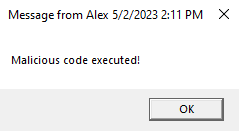
The following code sets an Event Filter that triggers every minute at second 42. This filter is connected to a CommandLineEventConsumer, which executes the obfuscated PowerShell code, which leads to the output via msg.exe. The configuration saved in this way remains active even after a system restart.
# Filter
$filter = Set-WmiInstance -Namespace "root\subscription"
-Class "__EventFilter"
-Arguments @{
    Name = "MyEventFilter"
    EventNameSpace = "root\cimv2"
    QueryLanguage = "WQL"
    Query = "SELECT * FROM __InstanceModificationEvent WHERE TargetInstance ISA 'Win32_LocalTime' AND TargetInstance.Second=42"
}

# Consumer
$consumer = Set-WmiInstance -Namespace "root\subscription"
-Class "CommandLineEventConsumer"
-Arguments @{
    Name = "MyEventConsumer"
    CommandLineTemplate = "powershell.exe -ExecutionPolicy Bypass
    -EncodedCommand bQBzAGcALgBlAHgAZQAgACoAIAAnAE0AYQBsAGkAYwBpAG8AdQBzACAAYwBvAGQAZQAgAGUAeABlAGMAdQB0AGUAZAAhACcA"
}

# Binding
Set-WmiInstance -Namespace "root\subscription"
-Class "__FilterToConsumerBinding"
-Arguments @{
    Filter = $filter
    Consumer = $consumer
}
Alternate Data Streams (ADS)
ADS is an NTFS feature that allows appending several data streams to a file. The default data stream is stored in the $DATA attribute.
In the following, a Base64-encoded command is written to another stream of a regular file named hidden, which can then be executed by getting the contents of this hidden stream.
Set-Content '.\RegularFile.txt' -Stream hidden -Value "VwByAGkAdABlAC0ATwB1AHQAcAB1AHQAIAAnAE0AYQBsAGkAYwBpAG8AdQBzACAAYwBvAGQAZQAgAGUAeABlAGMAdQB0AGUAZAAhACcA"

powershell -ec (Get-Content '.\RegularFile.txt' -Stream 'hidden')

# PS> Malicious code executed!
Tools
This section describes some tools for detecting and analyzing obfuscated Powershell code.
Eventlog
Since Powershell 5, calls to arguments and commands of typical obfuscated scripts – such as Bypass, FromBase64String, and DeflateStream – are automatically logged along with their contents at the warning level in the following event log under event ID 4104.
Microsoft-Windows-PowerShell%4Operational.evtx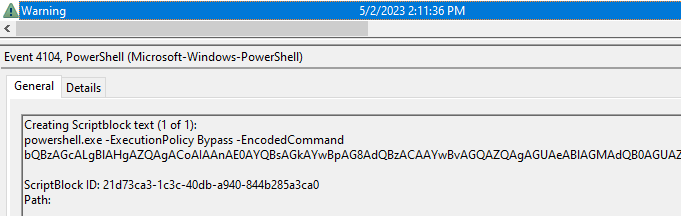
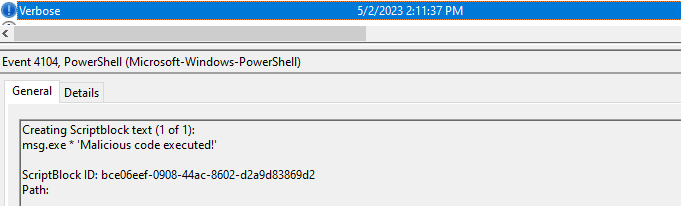
To get more insight into the logged obfuscated script, it is recommended to turn on Script Block Logging in the Group Policy.
Group Policy > Computer Configuration > Administrative Templates > Windows PowerShell > Turn on PowerShell Script Block LoggingBy activating Script Block Logging, the resolved script block layers are additionally logged at the verbose level under event ID 4104.
For even deeper logging of Powershell scripts, Module Logging and PowerShell Transcription can also be activated in the Group Policy.
Revoke-Obfuscation
Revoke-Obfuscation is a Powershell module by Daniel Bohannon that uses two main functions: Get-RvoScriptBlock and Measure-RvoObfuscation.
The function Get-RvoScriptBlock enables the extraction of local or external Eventlogs, while the function Measure-RvoObfuscation tries to classify a Powershell script as obfuscated or not. This function takes whole Powershell script files or extracted script blocks as input.
In the following example, the script blocks of the Powershell Eventlog are extracted through Get-RvoScriptBlock and then analyzed through Measure-RvoObfuscation.
$skriptblock = Get-WinEvent Microsoft-Windows-PowerShell/Operational | Get-RvoScriptBlock | Measure-RvoObfuscation -VerboseThe output shows the recognized obfuscated scripts and their hash values.
...
[34 of 46] NOT OBFUSCATED :: (34496E64527BF40DEAD53CF193D97E55F3...)
[35 of 46] NOT OBFUSCATED :: (B5CA27664A1E634B4E551F638FF3A4ACD9...)
[36 of 46] OBFUSCATED :: (FF19200070919B612CAFDDBC1F03541FAE...)
[37 of 46] OBFUSCATED :: (25E323F9DA18AC845E1C436538C74A2D82...)
...
The scripts can be viewed over the index (-1) of the previously defined variable.
$skript_block[35].Source
# @{ScriptBlock=.("{0}{2}{1}"-f'seT','item','-') ('vaRI'+'ABLE'+':U'+'7…
Chainsaw, Hayabusa
Chainsaw and Hayabusa are both CLI applications that work with Sigma rules to scan one or more Eventlogs. The applications can be executed with the following commands to scan for suspicious Powershell code:
chainsaw-2.5.0.exe hunt ".\Microsoft-Windows-PowerShell%4Operational.evtx" -s sigma/ --mapping mappings/sigma-event-logs-all.yml
hayabusa-2.2.2.exe csv-timeline -f ".\Microsoft-Windows-PowerShell%4Operational.evtx"
Besides obfuscation rules, there are several other rules for suspicious Powershell code:
Rule Suspicious Script
---- -----------------
Powershell Token Obfuscation obfuscated.ps1
Change PowerShell Policies to an Insecure Level obfuscated.ps1
Malicious PowerShell Keywords obfuscated.ps1
Potential WinAPI Calls Via PowerShell Scripts obfuscated.ps1
Suspicious PowerShell Keywords obfuscated.ps1
...
THOR
THOR and the free THOR-lite CLI applications also work with Sigma rules. Furthermore, they use YARA rules, so obfuscated or suspicious Powershell code can be recognized in other files. For example, LNK files can contain malicious Powershell code to load further code or files.
PSDecode
PSDecode is a helpful Powershell module for manually analyzing obfuscated Powershell code. It can recognize and reverse typical obfuscation techniques – such as Base64 or string obfuscation – so the analyzed code can become much more readable for further analysis.